When “automation boosts margins” stops being a useful sentence
Margins don’t slip because your team lacks tools. They slip because a few everyday workflows quietly eat time, create rework, or cap throughput—and you only notice when volume rises or hiring freezes. That’s when “automation boosts margins” stops helping, because it treats every process like it has the same payoff. In practice, automating a clean, stable task can free capacity fast, while automating a messy one can add exceptions, new handoffs, and a bigger support burden.
The hard part isn’t deciding whether automation is “good.” It’s deciding what would need to be true for automation to pay off in your environment—your demand swings, your data quality, your customer promises, and your tolerance for disruption. That’s the gap this article closes.
What would have to be true for automation to pay off here?

In a mid-sized ops team, the first automation conversation usually lands on headcount: “If we automate this, we won’t need to hire.” That only turns into profit if the freed hours translate into fewer hires, fewer contractors, or more throughput with the same team. If volume is flat and you can’t redeploy people to a bottleneck, you may just move work around and keep the same cost base.
For automation to pay off, a few things typically have to be true. The work needs enough repetition that rules hold most of the time, and exceptions need a clear path so they don’t pile up in someone’s inbox. Inputs have to be reliable enough that the system doesn’t spend its day failing on missing fields or mismatched IDs. And the process can’t be changing weekly; otherwise you’ll fund constant rework.
There’s also a practical cost: ownership. If no one can commit time to monitoring, fixing edge cases, and updating logic, the “savings” shows up as new support tickets and slower cycle times. That reality should shape which workflows you even put on the candidate list.
The uncomfortable inventory: which workflows are actually costing you margin?
That ownership reality is why the first step is an uncomfortable inventory: where do hours and errors actually turn into margin loss. Most teams can list “painful” processes, but pain isn’t the same as cost. Start with the workflows where work queues form even when people are trying hard: order changes, invoice exceptions, returns, customer onboarding, scheduling, claims, QA rechecks. If a process creates frequent rework or delays, it usually shows up in overtime, expedited shipping, credits, missed SLAs, or managers spending their day on escalations.
To make it concrete, pick 10–15 workflows and score them on four signals: labor hours per unit, cycle time impact, error rate/rework frequency, and how often it blocks downstream work. Then add a fifth column that matters more than people admit: “how measurable is the baseline?” If you can’t pull timestamps, counts, and exception reasons without a manual scrape, your ROI model will be soft and your pilot will turn into a data cleanup project.
If you automate this messy process, what breaks first?
When you pick a “messy” workflow, the first failure usually isn’t the model or the bot—it’s the edges you didn’t standardize. A field comes in blank, a customer uses a different name format, a product code changed last quarter, or the request arrives through email instead of the form. The automation can’t route it, so exceptions pile up. Then cycle time gets worse, and your team spends mornings babysitting the queue instead of doing the work you hoped to remove.
The next thing that breaks is accountability. If the process currently works because two people know the unwritten rules, automation forces those rules into a system someone must own. If that ownership isn’t explicit, fixes wait on IT, ops blames the tool, and frontline staff create workarounds like “just do it manually this time.” That kills your baseline and makes any ROI claim easy to tear apart.
Before you build, run a “failure rehearsal”: list the top 20 exception types from the last month and decide, for each, whether the system should auto-handle it, route it, or stop it at intake. The workflows that survive that exercise are the ones worth prioritizing.
Choosing 2–3 candidates when every team claims they’re the priority
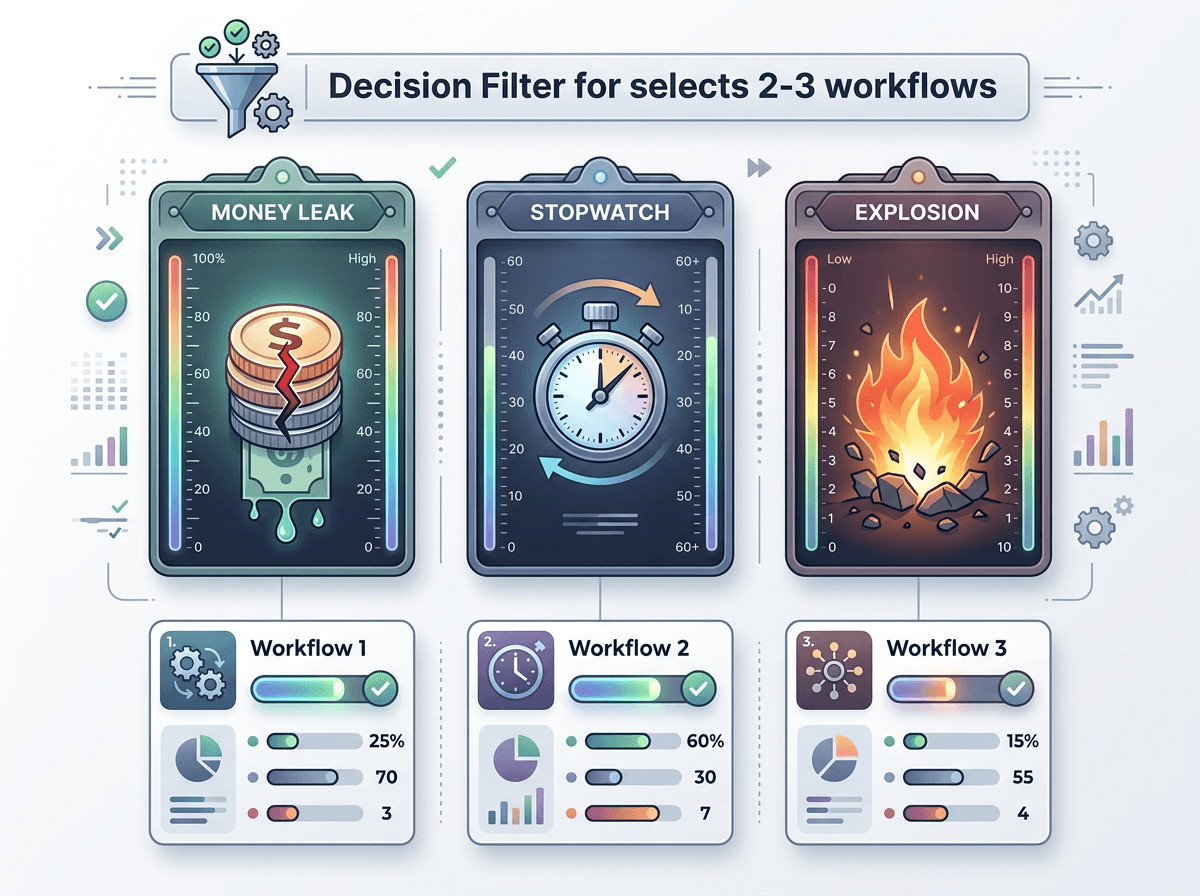
The workflows that survive that failure rehearsal still leave you with a different problem: everyone will argue their queue is the one that matters. If you try to satisfy every stakeholder, you’ll pick five “strategic” candidates and fund none of them well. Keep it tight. You’re looking for 2–3 workflows where impact is visible, the exception paths are known, and the result won’t depend on heroics from one team.
Use a simple filter that teams can’t game. Start with “margin leakage per week” in dollars (overtime, credits, expediting, contractor hours) and require a source for each number. Then add “time-to-proof”: could a pilot show movement in 6–8 weeks using existing data? Finally, add “blast radius”: if it fails for a day, does it delay shipping and billing, or just slow a back-office task?
Expect a real cost: you’ll say no to important work. Do it anyway, and pressure-test the short list by asking which one you’d still run if you lost your best operator for two weeks—then build an ROI estimate that can survive scrutiny.
Can you build an ROI estimate that won’t get torn apart?
That scrutiny usually shows up in a meeting where someone asks, “Are these savings real, or did we just move the work?” A defensible ROI estimate starts with a baseline you can audit: current volume, current cycle time, current exception rate, and the labor hours those exceptions consume. Put a name next to each input and attach the source system report or the manual sampling method. If you can’t explain where the number came from in 30 seconds, it won’t survive.
Then model savings in the only forms finance will credit: avoided hires/contractors, reduced overtime, reduced credits/chargebacks, fewer expedited shipments, or higher throughput without added headcount. Translate “hours saved” into dollars only if you can show where those hours come out of the plan. Otherwise, count them as capacity and state the constraint they relieve (for example, onboarding backlog).
Include costs that kill fragile cases: exception handling time, tool licensing, integration work, monitoring ownership, and the ramp period where output dips. If the math works after those, your pilot can focus on proving the two numbers people will challenge first.
The first pilot plan: proving profit without risking the quarter
Those two numbers you’ll get challenged on—baseline leakage and “hours that actually come out”—should drive the pilot design. Pick one workflow and one success path (for example, invoice exceptions under $X, from one channel, for two regions) and run it in parallel for 4–6 weeks. Define a stop rule upfront: if exception backlog grows past Y or cycle time worsens for Z days, you pause and fix intake before expanding.
Instrument it like a finance test, not a demo: weekly volume, touch time per item, error/rework rate, and downstream impact (credits, expediting, missed SLA). Assign an ops owner with time blocked for triage; otherwise the pilot “succeeds” by creating hidden manual cleanup. When the proof holds, you’ll know exactly what to scale—and what to leave alone.