Why “database search” feels broken in modern data stacks
You can have clean tables, solid ETL, and a warehouse that answers metrics fast—and still watch people fail at “finding the thing.” The common pattern is a Slack question that should be a two-minute lookup (“where’s the latest contract clause?” “which ticket explains this error?”), followed by a trail of links, screenshots, and half-remembered queries. Teams end up re-creating knowledge that already exists because retrieval is harder than storage.
Modern stacks spread truth across systems that were never designed to behave like one searchable library: a data warehouse for facts, a BI layer for curated views, a ticketing system for incident history, docs in a wiki, and customer context in a CRM. Each has its own access rules, field names, and search behavior. Even when everything is “integrated,” search usually isn’t; it’s bolted onto each tool separately, so relevance breaks at the boundaries.
Keyword-heavy search adds friction in places where language is messy. People search for “refund policy,” but the doc says “chargeback workflow.” An analyst remembers an internal term that only appears in a dashboard title, while the underlying table uses different naming. SQL helps when you know the schema and the exact fields to filter, but most real questions start as fuzzy intent, not a precise query. The result is predictable: too many misses, too many false positives, and a rising operational cost in time, interruptions, and duplicated work.
Where traditional SQL and keyword search hit a wall
A familiar failure is when the data exists, but the query language assumes you already know where it lives and what it’s called. SQL is excellent for well-defined questions (“orders last quarter by region”), but brittle for investigative ones (“what changed in onboarding that increased churn?”). You end up guessing which tables, columns, and join paths might contain clues, and small naming differences (“acct_id” vs “account_id”) or missing keys turn “search” into a schema archaeology project.
Keyword search looks simpler, but it collapses under synonymy, acronyms, and uneven writing. The same incident might be logged as “OOM,” “out of memory,” or “container eviction,” and only one term appears in the postmortem title. Filters help, but only if metadata is consistent—and in most stacks, it isn’t. You also hit a hard ceiling across silos: the warehouse can’t natively rank wiki pages, and the wiki can’t respect warehouse-level row security without custom work.
There’s a practical cost to trying to patch this with rules: more curated fields, more tag mandates, more “search tips” docs, more analyst time spent building brittle lookup views. It can improve hit rates, but it also adds maintenance overhead and creates failure modes that are hard to detect—quietly missing the right result is often worse than returning none.
What changes with semantic search and embeddings
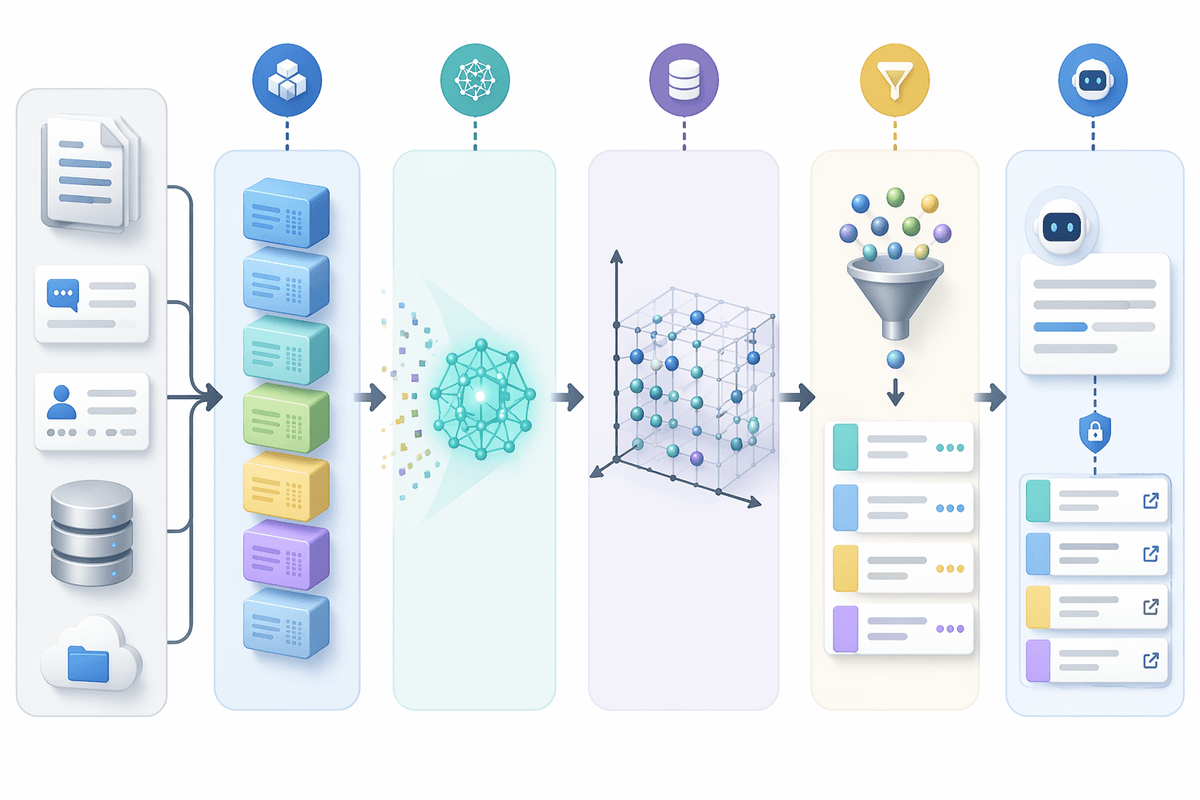
Someone types “refund policy” and the right answer lives in a doc that says “chargeback workflow,” a ticket that mentions “RMA,” and a CRM note that uses a customer’s phrasing. Semantic search changes the match function: instead of relying on exact words, it represents each chunk of text (or row description) as an embedding—a numeric fingerprint of meaning—so related concepts land near each other even when vocabulary differs.
In practice, retrieval becomes “find items most similar in intent,” then rank and filter. That makes fuzzy questions workable: you can retrieve the onboarding PR discussion, the relevant runbook, and the metric definition without knowing the right keyword or table name. It also enables RAG-style flows, where an assistant drafts an answer but is constrained to cite retrieved sources rather than inventing.
The trade-off is operational: you pay to generate and refresh embeddings, you need chunking and metadata to avoid pulling the wrong passages, and relevance can drift as language and products change. Security still matters too—vector indexes must respect the same access rules as the underlying systems.
Hybrid retrieval: combining vectors, keywords, and filters
You rarely want “pure semantic” retrieval in a business stack, because many questions contain hard constraints that embeddings shouldn’t guess. A support lead searching “SOC2 retention policy 2025” expects the year and document type to matter. An engineer searching an error string expects exact token matches. Hybrid retrieval treats semantic similarity as one signal among others: pull candidates with vectors, but also require (or boost) keyword hits, and apply filters like product area, owner team, customer segment, environment, and time range.
This combination usually improves precision without losing recall. A practical pattern is two-stage retrieval: first, use filters to narrow the searchable universe (only “public docs,” only the caller’s org, only last 90 days), then run semantic + keyword ranking inside that slice. The limitation is cost and complexity: you’re maintaining multiple indexes, tuning weights, and dealing with latency spikes when queries fan out across sources. The upside is predictable behavior—users can see why something matched, and you can tighten governance without breaking discoverability.
Getting your data ready: chunking, metadata, and freshness
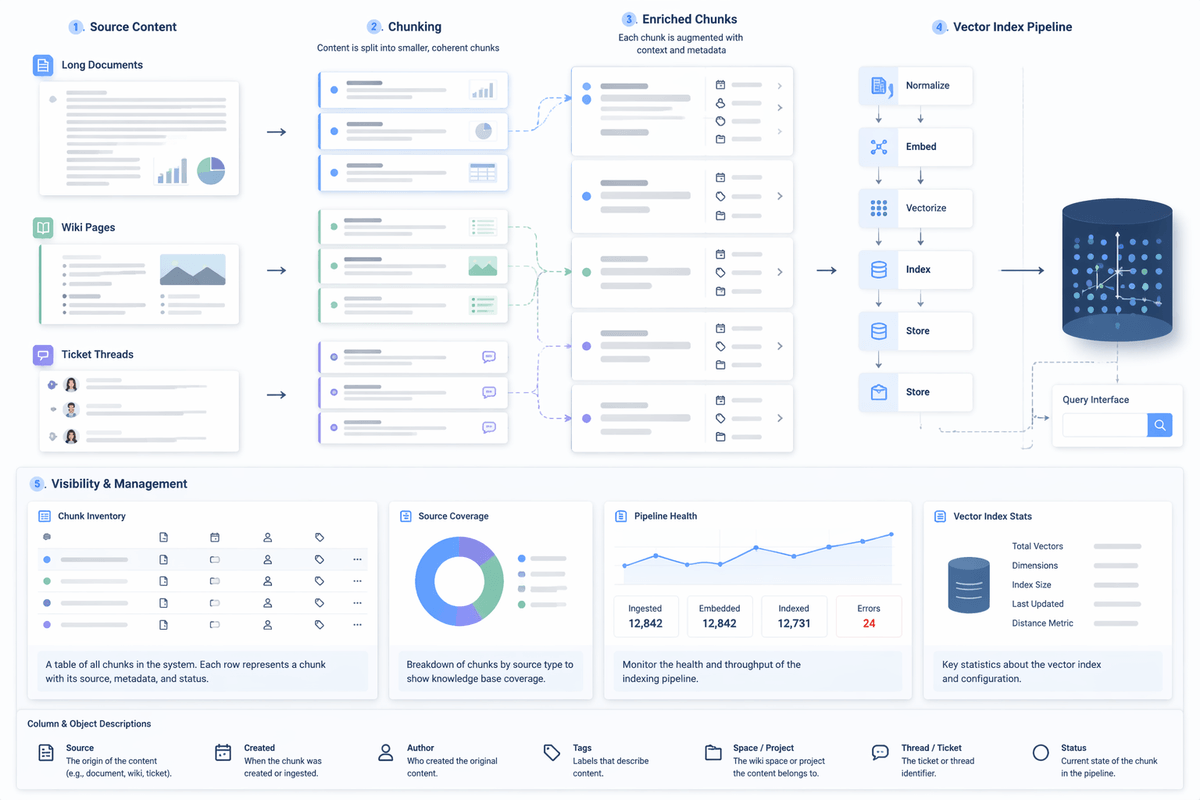
The familiar pilot failure is blaming “the model” when the real issue is that the content isn’t shaped for retrieval. Long docs, wiki pages, and ticket threads need chunking: break them into small, coherent passages that can stand alone, with enough surrounding context to be useful. Too large and you pull irrelevant sections; too small and you lose meaning, plus you inflate index size and embedding cost. Tables and dashboards often need short, human-readable descriptions per object or column, because embeddings can’t recover intent from cryptic field names.
Metadata turns “pretty good” into “safe and predictable.” Attach owner, system of record, document type, environment, product area, customer/org scope, and effective dates, then enforce access control at query time using those fields. Without this, hybrid search can surface the right paragraph from the wrong tenant or the wrong region. Freshness also needs an explicit plan: decide what triggers re-embedding (edits, status changes, new partitions), how quickly updates appear, and what you can afford in compute and ingestion latency.
Architecture choices: database extensions, vector stores, or search engines
A common fork in the road is whether to “bring vectors to the data” or “bring the data to the vectors.” Database extensions keep embeddings close to relational tables, which simplifies joins, transactions, and governance when your primary content is already in a warehouse or Postgres-style system. The practical win is fewer moving parts and clearer ownership. The limitation is that similarity search features, indexing options, and query tooling can be less mature than dedicated retrieval systems, and performance tuning may compete with analytical workloads.
Dedicated vector stores make ingestion and nearest-neighbor search straightforward and can scale independently, which helps when you’re indexing lots of unstructured text across wikis, tickets, and docs. You now run (and secure) another datastore, keep metadata in sync, and make access control consistent with source systems. If that governance glue is weak, you’ll ship impressive demos that can’t pass a real security review.
Search engines sit in the middle when keyword relevance, faceting, and explainable ranking matter. They can do hybrid retrieval well, especially for log-like text and document libraries, but you pay for index pipelines, schema design, and ongoing relevance tuning. A useful selection test is to start from your hardest constraint—row-level security, latency targets, or cross-silo ingestion—and pick the architecture that makes that constraint boring rather than heroic.
Measuring improvement and avoiding the usual failure modes
The pilot feels successful when a few impressive queries work, but production success is when the median query improves for real users under real permissions. Start with a small, representative test set: 50–200 actual questions pulled from Slack, support escalations, analyst notebooks, and incident reviews. For each, define “good” as a specific source artifact (doc section, ticket, dashboard, table) rather than a generated answer. Track recall@k (did the right thing appear in the top 5–10), precision (how many top results were noise), latency p95, and coverage by source (which silo still fails).
Most failures are predictable. Hallucinated answers usually trace back to weak retrieval or oversized chunks, so require citations and set a “no sufficient sources found” path that returns links, not prose. Security issues come from indexing without enforcing ACLs at query time, or from leaking metadata in snippets; test with “red team” queries from accounts with different access. Cost blowups show up in re-embedding frequency, over-chunking, and multi-silo fan-out, so meter embedding jobs, cap query expansion, and budget for relevance tuning time—not just infrastructure.
A useful operating rule is to treat retrieval as a product surface: measure it weekly, review misses, and adjust chunking, metadata, and ranking weights like you would any other core workflow.
A practical path to adopt AI search without overhauling everything
A practical adoption path starts with one painful workflow and one source of truth, not “search everything.” Pick a narrow slice like runbooks + incident tickets, or contract clauses + policy docs, and define success as “top 5 contains the right artifact under the caller’s permissions.” Stand up hybrid retrieval with tight filters (team, system, date), require citations, and ship it as a lookup tool before you let it generate prose.
Keep the stack light at first: reuse your existing database or search engine if it can enforce ACLs and meet p95 latency, and add embeddings only where keyword recall is clearly failing. Budget for ongoing tuning time—chunking revisions, metadata cleanup, and a weekly miss review—because relevance drifts as terminology and products change. When the pilot consistently improves recall@5 and doesn’t leak restricted content, expand source-by-source with the same metrics and guardrails.